Deep Dive • Security Control
Operationalizing Privacy: How MCP Keeps Enterprise Data Secure (Part 3)
In Part 1 of this series, I discussed how evolving technologies like the Model Context Protocol (MCP) from Anthropic and AI Agents are forcing us to rethink how we operationalize privacy in the age of AI. In Part 2, we deconstructed the architecture—exploring how the MCP Host, MCP Servers, and Global LLMs like Claude interact through the practical example of auditing S3 buckets against a Record of Processing Activities (RoPA).
In this Part 3 instalment, we will explore exactly how enterprise data remains secure despite involving a global LLM like Claude.
Missed the beginning? If you haven't read the first two parts, I highly encourage you to do so: [Part 1: Rethinking Privacy Operations in the Age of AI Agents] and [Part 2: The Architecture of Agentic Privacy]. Understanding the architecture and data flow is essential to grasping the security controls discussed below.
The Security Boundary
As illustrated in our architectural diagram, MCP creates a hard security boundary. In this model, the Cloud LLM is used strictly for reasoning and strategy—it is never used for data storage or direct processing. In this ecosystem, the MCP Host acts as your Data Firewall.
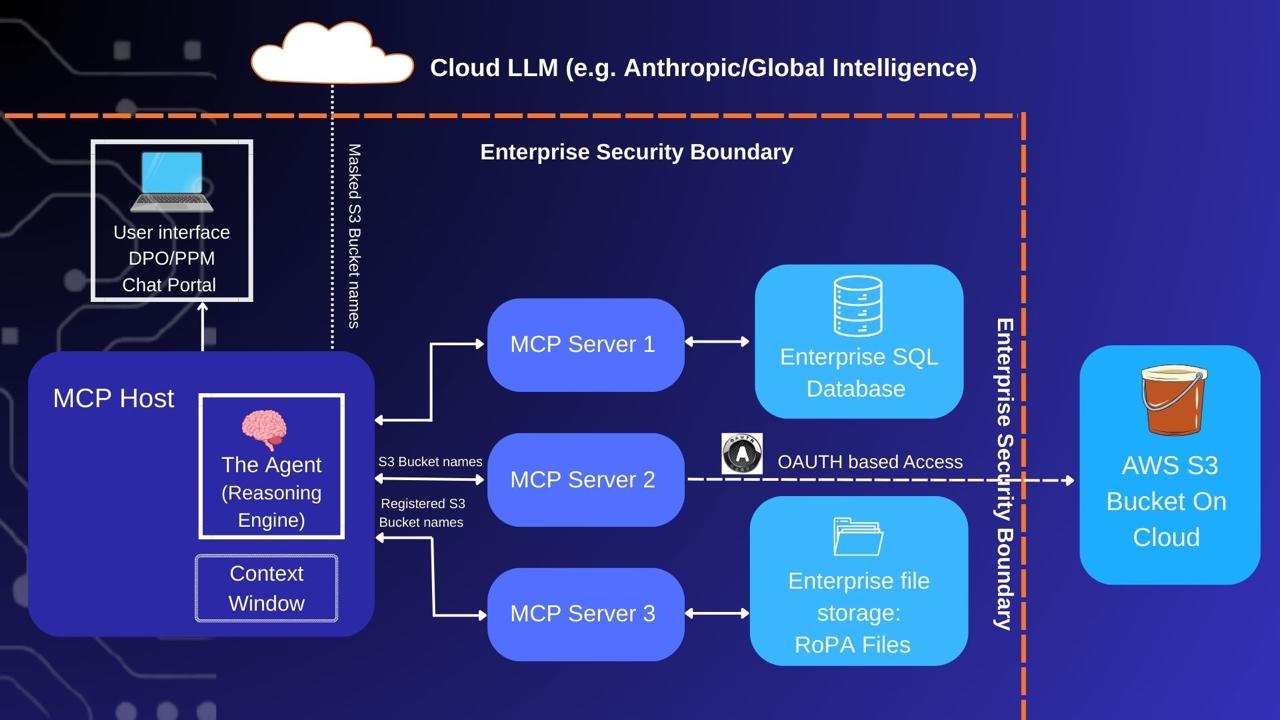
Figure 1: The Security Boundary and Local Data Firewall
Four Pillars of Agentic Privacy Controls
To prevent data leakage, we employ four specific privacy controls:
PII Redaction & Masking
Before data is ever committed to the Context Window, a local server script scrubs sensitive PII (names, emails, SSNs, or credit card numbers) and replaces them with unique tokens (e.g., User_01). The Cloud LLM sees only anonymized data.
Role-Based Access Control (RBAC)
The MCP Server inherits the permissions of the user running it. If a user has read-only access to S3, the Agent is physically incapable of modifying or delete a bucket, regardless of what the LLM "instructs" it to do.
Secure Authentication
Enterprise Agents connect to data sources via OAuth or App Passwords. OAuth is the gold standard here, providing scoped, revocable tokens that ensure your primary credentials are never exposed to the agent or the cloud.
Comprehensive Audit Trails
Because the Host orchestrates every interaction, you can log every tool call and data access event to a centralized SIEM (Security Information and Event Management) system for real-time compliance monitoring.
A Secure Data Flow in Action
Let’s revisit our audit prompt: "Find all AWS S3 buckets containing PII that are not listed in our RoPA (Record of Processing Activities)." Here is how the security-integrated flow works:
Step 1: The Request (Local → Cloud) The local Host packages your prompt with a "menu" of available tools (list_s3_buckets, read_ropa_file) and sends it to Claude. Claude uses this menu to plan the logic, not to access data.
Step 2: Reasoning (Cloud → Local) Claude realizes it cannot "see" your infrastructure. It sends back a logic instruction: "I need a list of S3 buckets. Please execute the list_s3_buckets tool and return the results."
Step 3: Execution & Least Privilege (Local → AWS → Local) The Host wakes up the S3 MCP Server. Least Privilege: The server uses an IAM role configured specifically for this agent—restricted to Read-Only access. Data Retrieval: Using OAuth tokens, the server fetches the bucket names: [finance-bucket, employee-data-john-smith, employee-data-sri-gopal]. This retrieval happens entirely behind your firewall.
Step 4: Deterministic Masking (Local → Cloud) The Agent prepares to send the results to Claude, but the Host's Data Firewall intercepts it. It recognizes the pattern employee-data-[Name] and redacts the names locally using a hashing function. The Result: The Agent tells Claude: "I found these buckets: [finance-bucket, employee-data-584e, employee-data-6b9y]. What is the next step?"
Step 5: The Comparison Plan (Cloud → Local) Claude now needs the registry for comparison. It instructs: "Use the read_ropa_file tool to retrieve the official S3 registry."
Step 6: Final Analysis & Local Synthesis (Local → Cloud) The Host triggers the Filesystem MCP Server to read the local RoPA. The file is analyzed locally. Symmetric Masking: To ensure Claude can compare the two lists, the Host runs the exact same hashing function on the names in the RoPA file. "Sri Gopal" is hashed again to 6b9y. The Handshake: The Host sends this "clean" list to Claude. Because the masking is deterministic, Claude can perform complex cross-referencing without ever knowing the actual identities of the individuals.
Step 7: The Result (Cloud → Local) Claude performs the logic and identifies the discrepancy: "Bucket employee-data-584e is not in the RoPA. This is a privacy violation." The Local Host receives this, "de-redacts" the hash back to the original name and presents the final alert to the user: "Bucket employee-data-john-smith is not in the RoPA. This is a privacy violation."