Deep Dive • Technical Architecture
The Architecture of Agentic Privacy
Before we dive into the technical architecture and ‘how-it-works,’ I highly recommend reading Part 1: Rethinking Privacy Operations in the Age of AI Agents. While this article explains the architecture, Part 1 sets the essential context for why this shift in AI strategy is necessary for modern enterprises. Reading them in order will provide the clearest roadmap for your privacy journey.
To understand how an AI can safely handle sensitive data, we must first look at its "blueprint." We use the Model Context Protocol (MCP)—an open standard that allows us to separate the "Brain" (the AI) from the "Hands" (the data connectors).
The Components
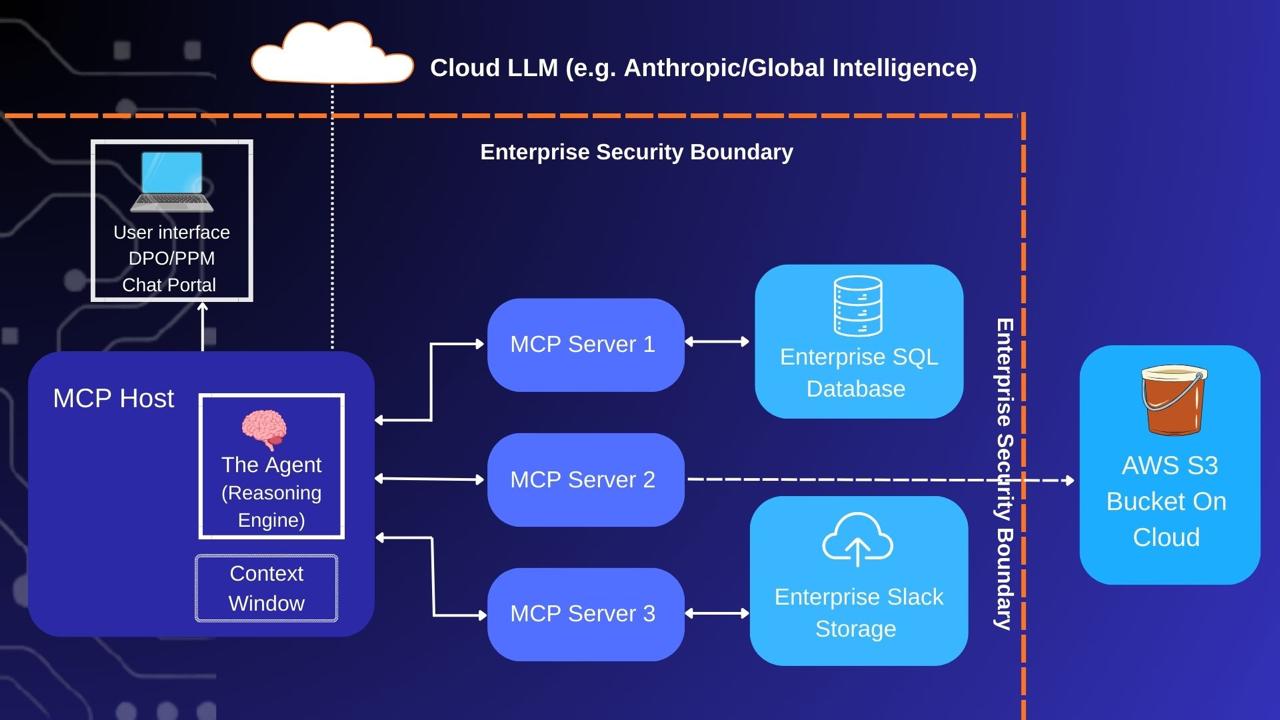
Figure 1: The Blueprint of Agentic Privacy using MCP
MCP Servers (The Specialized Gatekeepers)
Each server is a lightweight program (often written in Python) that lives locally on your infrastructure. For example, a “SQL Server” script sits dormant until the Host spawns it as a “child process.” These servers contain Tools or Capabilities—specific functions described in plain English that the AI can understand and call upon.
MCP Host (The Orchestrator)
The Host is the central manager. Upon startup, it reads a configuration file, identifies all your installed MCP Servers, and initiates them as secure background processes. It manages the traffic between the user, the AI, and the data.
The Agent (The Reasoning Engine)
Sitting inside the Host, the Agent is the “Worker with a Brain.” It is not a simple chatbot; it is a behavioral layer configured with the autonomy to select the right tools for a task. It reads your prompts, applies logic, and decides which MCP Server to “wake up.”
The Context Window (The Secure Workspace)
Think of this as the LLM’s short-term RAM. It is a temporary workspace where the Host “pastes” the data it finds (e.g., 100 rows from a database) so the Agent can analyze it. Data is only held here for the duration of the task.
The Role of the Cloud LLM
It is a common misconception that enterprise AI requires a "new" model for privacy. Claude has already "read" the public internet—including the full texts of IAPP GDPR, CCPA, and NIST frameworks. It already understands privacy law better than most humans.
When a provider refers to a "Privacy Agent," they aren't releasing a new model; they are providing a System Prompt and a Workflow Layer. This prompt sets a "Senior DPO Persona" with strict instructions (e.g., "Always cross-reference S3 activity against Article 9 of the GDPR"). They then package this with pre-configured MCP Servers (Tools) designed to talk to systems like OneTrust, Jira, or your internal databases.
How the Data Flows: A Case Study
Prompt: "Find all AWS S3 buckets containing PII that are not listed in our RoPA (Record of Processing Activities)."
Request (Local → Cloud): The local Host packages your prompt with a "menu" of available tools (e.g., list_s3_buckets, read_ropa_file) and sends it to Claude in the cloud. Claude needs this menu to decide how to fulfill your request.
Reasoning (Cloud → Local): Claude realizes it cannot "see" your S3 buckets from the cloud. It sends back an instruction: "I need a list of S3 buckets. Please execute the list_s3_buckets tool and return the results."
Execution (Local → AWS S3 → Local): The Host receives the instruction and wakes up the S3 MCP Server. This local script connects to AWS, fetches the bucket names [A, B, C, D], and brings that list back inside your firewall.
Observation (Local → Cloud): The Agent pastes these bucket names into the Context Window and tells Claude: "I found buckets A, B, and C. What is the next step?" Note: Only the names were sent; no actual files have left your network.
The Comparison Plan (Cloud → Local): Claude now needs the bucket list recorded in RoPA to compare against. It instructs: "Use the read_ropa_file tool to get the official registry of S3 bucket list."
Final Analysis (Local → Cloud → Local): The Host wakes up the Filesystem MCP Server to read your local RoPA. The results are handed to the Agent, which sends the final comparison to Claude.
The Result: Claude performs the final math and sends the answer back: "Bucket C is not in the RoPA. This is a privacy violation." The DPO sees the result instantly on their dashboard.